
RealSync BankFlow


Bank transfer payments, reconciled automatically.
Connect your Shopify store. Connect your bank. BankFlow matches the payments and marks your orders paid.

Stop chasing bank transfers
Still logging into the bank every morning to see who’s paid? Copying references into Shopify one order at a time, while customers wonder why their order hasn’t shipped?
Bank transfers are popular with Aussie shoppers, especially for bigger orders, and they cost you nothing in card fees. But the reconciliation is all manual. Someone has to check the bank, find the order and mark it paid before anything goes out the door. It’s slow, it’s easy to get wrong, and it gets worse the busier you are.
RealSync BankFlow does that job for you. It reads your bank transactions securely through Open Banking, matches them to your Shopify orders and marks them paid. You just pack and ship.
Up and running in four steps
1. We onboard your business The RealSync BankFlow team gets your business set up on the platform and walks you through everything. We’ll also help set up bank transfers in Shopify: a manual payment method at checkout, and an order confirmation email that tells customers exactly which reference to use. Clear instructions mean more payments match automatically.
2. Connect your Shopify store Install BankFlow on your store. Your bank transfer orders show up automatically.
3. Connect your bank via Open Banking Link your business bank account securely through Australia’s Consumer Data Right (CDR) framework. You choose exactly which accounts RealSync BankFlow can see, and it only gets tightly controlled, read-only access to the transactions on those accounts. It can’t move money, make payments or touch anything you haven’t shared with it. You stay in control: you can withdraw access at any time, and consent expires unless you renew it.
4. Let it run When a customer pays with their order number as the reference, BankFlow finds the payment, matches it to the order and marks it paid in Shopify. It runs automatically throughout the day, without you having to do anything.
Why BankFlow?
| Doing it by hand | RealSync BankFlow | |
|---|---|---|
| Checking payments | Logging into the bank and scanning statements | Transactions pulled in automatically via Open Banking |
| Matching | Cross-referencing order numbers by eye | Automatic matching on the order number in the payment reference |
| Updating Shopify | Marking each order paid by hand | Orders marked paid in Shopify automatically |
| Odd payments | Hunting through statements for the right transaction | The likely payment is flagged at the top of the list, ready to confirm |
| Record keeping | "Who marked this paid, and why?" | Bank transaction details saved on every Shopify order |
Key features
Automatic payment matching
Customers pay using their order number as the reference, for example #1063. BankFlow spots it, matches the payment to the order and marks it paid in Shopify. Your team can start fulfilling straight away.

Every bank transfer order in one place
See what’s paid, what’s pending and what’s still owing on a single dashboard. You can filter by order number, customer, date or status.
A full audit trail in Shopify
Every match writes the bank transaction ID, reference, payer and amount onto the Shopify order, plus a timeline entry showing when it was marked paid. When someone asks “has this been paid?”, the answer is right there on the order.
Covered when customers go off-script
Most payments match on their own, but customers don’t always follow instructions. If someone puts just their name in the reference, BankFlow flags the most likely payment at the top of the list. Confirm it in a click and the order’s marked paid.

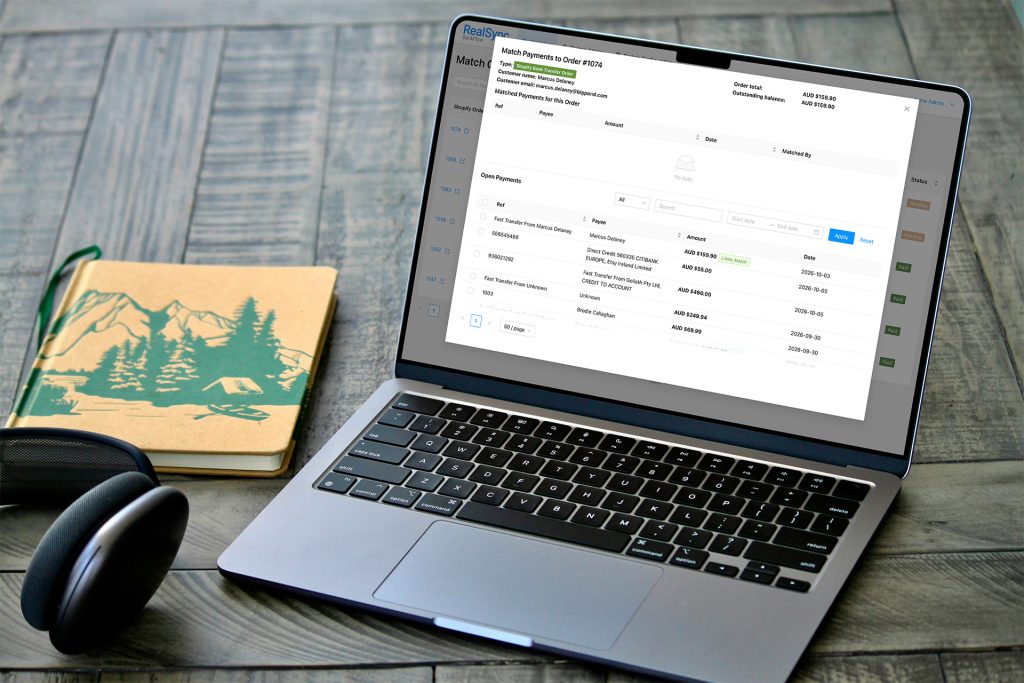
Get paid faster with RealSync BankFlow
Spend less time in your banking app and more time running your business. BankFlow brings your bank and your Shopify store together, so bank transfer orders get reconciled while you get on with everything else.